Reviewed · TOKYO TOURS
Japan: eSIM with Unlimited Local 4G/5G Data
An unlimited data eSIM for Japan is interesting because you can skip the SIM swapping hustle and get online with just a QR code. It runs on KDDI(au) 4G/5G, so your phone can stay useful for maps, translation, and ride planning.
I love the way the plan is built around unlimited local data (the Ultra option is unthrottled). I also like that the connection has a reputation for being solid even in tricky places like crowded areas and the subway.
One drawback to plan around is timing and install accuracy. The QR code in the voucher is not the eSIM QR code, and the service connects after you arrive in Japan. If your device isn’t eSIM compatible, you’ll want to catch that before purchase.
Key Things That Matter Most
- Ultra vs Lite speed tradeoff: Ultra is unlimited 5G/4G with no throttling, Lite caps max speed at 10 Mbps.
- The correct QR code timing: the voucher QR code is not the eSIM QR code, and the right one is emailed 1 day before.
- Activation is after arrival: the eSIM connects to the local network only after you’re in Japan.
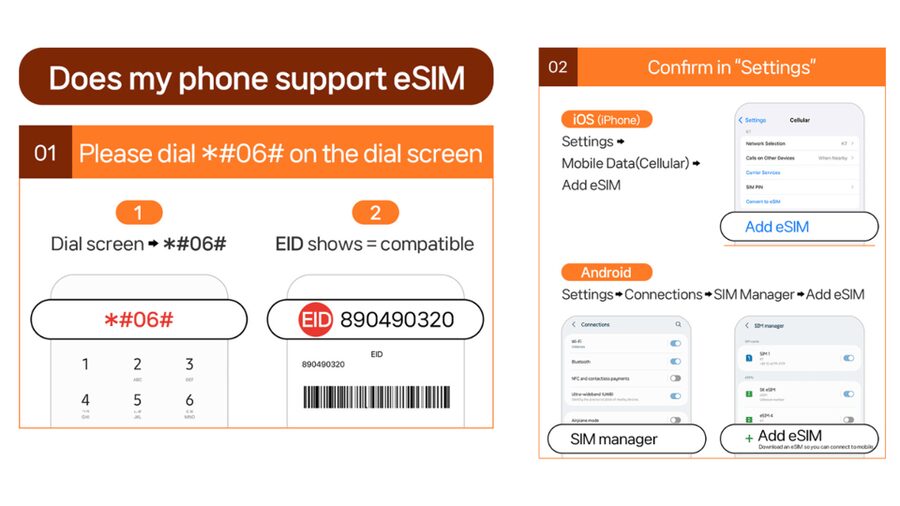
- Device check is worth it: confirm eSIM support by checking whether your phone shows EID with #06#.
- Hotspot is allowed with limitations: tethering works, but the plan notes restrictions depending on which option you choose.
Japan eSIM at a Glance: What This Really Gives You
This is an eSIM data plan for Honshu, Japan, built to keep you connected on local networks through KDDI(au). You buy it, you get a QR code by email, and you install the eSIM. After you arrive, the eSIM connects, and you get unlimited 4G/5G data for your trip.
For me, the value is simple: you avoid hunting down a physical SIM in Japan, or dealing with pop-up “data booths” when you’re tired from travel. At $10 per person, you’re paying mainly for convenience plus local coverage. If you want a phone that stays reliable for the whole trip, this style of plan makes a lot of sense.
Just remember the plan is data-only. Voice and SMS are not included, so you should use apps (like messaging apps) and Wi-Fi when needed, rather than expecting normal call/text service.
Also on the shortlist for Tokyo:
- Mt Fuji and Hakone 1-Day Bus Tour Return by Bullet Train
★ 5.0 · 26,383 reviews - 1-Day Tokyo Bus Tour
★ 5.0 · 14,250 reviews - Tokyo: TOKYO SKYTREE® Admission ticket
★ 4.5 · 11,192 reviews
Ultra vs Lite: Choosing Between Speed and Calendar Days
You basically have two options, both on unlimited local data but with different speed behavior.
Ultra (3 to 30 days)
- Unlimited 5G/4G local data
- No throttling listed
- Hotspot supported, with limitations (so it is not a free-for-all)
- Voice and SMS not included
Lite (3 to 10 days)
- Unlimited 5G/4G local data
- Max data speed is 10 Mbps
- Hotspot supported, with limitations
- Voice and SMS not included
Here’s how I’d think about it as a traveler. If you rely on video, heavy navigation, frequent uploads, or you want the least friction possible, Ultra is the safer pick. If your trip is shorter and you mostly use maps, translation, and regular web use, Lite can still be great value.
Also, the Lite plan has a specific usage calculation based on calendar days. Activation time matters. For example, activating at 10 PM Japan time counts as 1 full day by midnight. That detail matters if your travel days are tight, because you might accidentally “spend” an extra day.
Your QR Code Timing: Voucher Confusion and Email Delivery
The biggest “gotcha” is that the QR code shown on the voucher is not the eSIM QR code you need. The correct eSIM QR code is delivered separately by email 1 day before your activity date.
That means you should not plan to install it right after you buy. Your best move is to:
- Buy when you’re confident about your dates
- Watch your email the day before
- Install promptly once you get the QR code
There’s also an installation rule: the eSIM QR code must be installed and activated within 30 days of purchase. If you’re flexible with dates, that may still be fine, but don’t treat it like an open-ended souvenir. Once that window closes, the QR code may no longer work.
Setup After You Land: When the Data Actually Starts
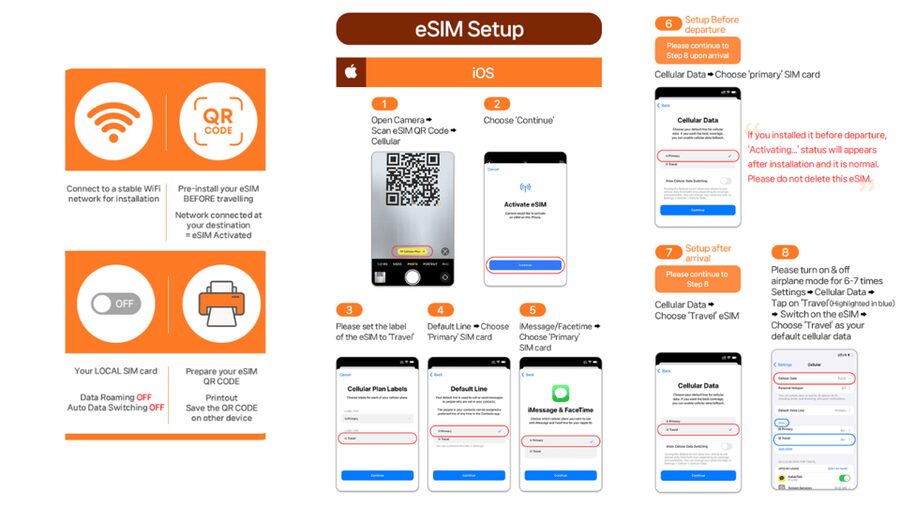
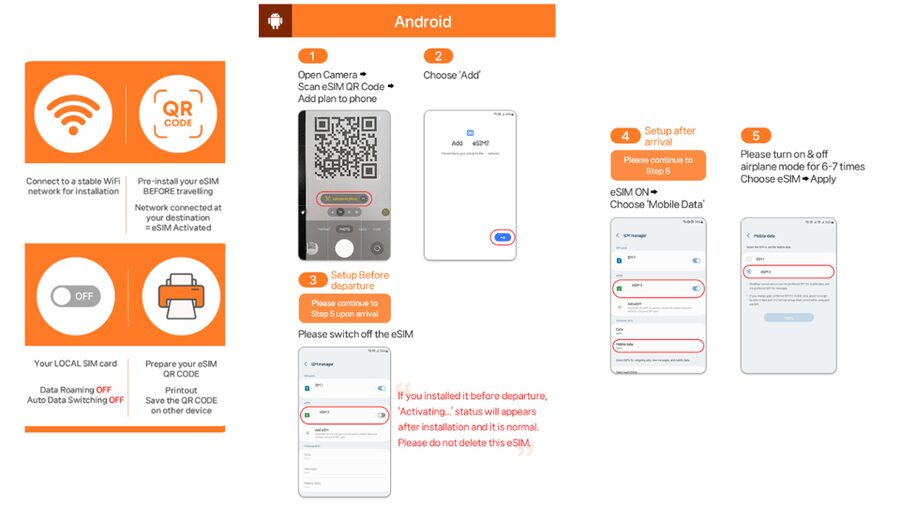
The eSIM connects to the local network after you arrive in Japan. That detail is important because it changes how you plan your first day.
In practical terms, I recommend you do your installation step with Wi-Fi available before you fully rely on it, but keep your expectations realistic:
- You will still need to be in Japan for the service to connect locally.
- If you arrive and do the install, your first data should come online once the eSIM is connected to KDDI(au).
Also, you’ll want your phone ready for eSIM in general before you buy. The plan specifically asks you to check for eSIM compatibility by using #06# on the dial screen, and seeing whether EID appears. If EID does not show, your device may not be compatible with eSIM.
Finally, confirm your phone can accept foreign SIMs or eSIMs. The plan calls out that your phone must be set up for that, so don’t assume it will work if you bought your phone through a carrier with strict restrictions.
A change of pace from Tokyo:
- Tokyo: teamLab Planets TOKYO Digital Art Museum Entry Ticket
★ 4.6 · 9,779 reviews - Mt Fuji & Hakone Cruise, Drum Show Bullet Train 1 Day from Tokyo
★ 4.0 · 7,413 reviews - Tokyo: Sumo Show Experience with Chicken Hot Pot and a Photo
★ 4.8 · 6,678 reviews - Tokyo: Shinjuku Food Tour (13 Dishes at 4 Local Eateries)
★ 5.0 · 6,603 reviews
Real-World Connection: 5G, 4G, and Subway Reality
This plan is designed for fast local data on KDDI(au) with 5G or 4G. In real travel life, signal strength can change based on where you are. The plan notes that 5G can be affected by location, like indoors, underground, or in crowded areas, so your connection may switch to 4G.
I like this kind of honesty because it helps you troubleshoot calmly. If you don’t see 5G everywhere, you’re not failing. Your phone is just negotiating the best available network.
There’s also a big practical win here: this plan’s data-first approach works for everything you do with your phone. When you’re hopping trains, switching transit lines, and double-checking stations, you don’t want your connection to be fragile. The feedback focus around setup ease and reliable signal, including subway use, is exactly what you want from an “arrive and go” data plan.
If you want one extra layer of sanity, plan to download any heavy offline maps or essential content before you land. Then let the eSIM handle everything after that.
Hotspot Tethering With Limits: Sharing Without Surprises
Hotspot sharing is included, but with limitations depending on the selected plan. That means you can connect another device, like a tablet or laptop, but you should treat tethering as “supported” rather than “unlimited on every device.”
If your travel style includes:
- A second device that needs internet
- A laptop for check-in or document work
- A family using one phone as a connection
…this feature is useful. But if you plan to stream lots of video on multiple devices at once, the Lite max speed and hotspot limitations may feel restrictive.
A good rule: if you’ll use hotspot often, lean toward Ultra for the best chance of smooth performance. If you’ll use it occasionally, Lite can still be fine, as long as you accept the 10 Mbps cap.
Speed Expectations You Should Plan Around (Ultra vs Lite)
Speed is where these two options start to diverge.
Ultra
- Unlimited 5G/4G local data
- No throttling stated
Lite
- Unlimited 5G/4G local data
- Max speed 10 Mbps
In daily use, 10 Mbps is usually enough for maps, messaging, and web browsing. The difference shows up when you do bandwidth-hungry tasks, like streaming, video calls, or large uploads.
Also, the plan duration changes the overall value. Ultra can run for 3 to 30 days. Lite is 3 to 10 days. If your trip is longer than 10 days, Ultra becomes your only fit based on what’s listed.
So think of it like this:
- Short trip, basic phone tasks, and you want the lowest fuss: Lite.
- Longer trip or you want the best performance level across the board: Ultra.
Troubleshooting the Most Common eSIM Problems
Here’s where you can save time. If you see a message like QR code is invalid, the plan recommends a specific fix path.
Do this first:
- Open Settings on your phone.
- On iOS, go to Settings > Cellular.
- On Android, go to Settings > Connections > SIM Manager.
- Check whether there is a new eSIM showing in the list.
Often the issue is not that the eSIM is impossible. It’s that your phone isn’t displaying the installed profile correctly, or the QR code install step didn’t finish cleanly.
If you’re still stuck, the plan advises you to contact the supplier by email or WhatsApp. The provider listed for this experience is LINK KOREA, so that’s the party you would reach out to for support.
One more timing reminder: remember the voucher QR code and the actual eSIM QR code are different. If you try to install the wrong one, you’ll waste the most precious thing on a trip, your first evening in a new country.
Who This eSIM Is Best For (and Who Should Skip It)
This plan is a strong match if you:
- Want unlimited data for planning and daily use
- Prefer eSIM convenience over finding a physical SIM
- Are comfortable installing an eSIM using QR code steps
- Need hotspot sharing but understand it has limitations
- Are using your phone primarily for data apps, not traditional voice calls and SMS
It may be a poor fit if:
- Your phone cannot show EID with #06# or is not eSIM compatible
- You absolutely need voice and SMS service included
- You expect the voucher QR code itself to install the service (it won’t)
For most people, the “risk” comes down to device compatibility and QR code timing, not coverage. If you prepare, the plan is straightforward.
Should You Book This Japan Unlimited eSIM?
If you want fast, local data in Japan without buying a physical SIM, I think this is a solid buy, especially at $10 per person. The Ultra option is the best choice if you care about consistent speed and plan to be online constantly. Lite is a smart value if your trip is under 10 days and you mainly use the basics.
My main advice is practical: verify eSIM compatibility first with #06#, and wait for the correct eSIM QR code email 1 day before. If you do those two things, you’ll avoid most of the painful setup moments.
FAQ
How much does this Japan unlimited eSIM cost?
The price listed is $10 per person.
What network does the eSIM use in Japan?
It uses KDDI(au) 5G/4G local data coverage in Japan.
Do I need a physical SIM card?
No. This is an eSIM you install using an eSIM QR code.
Do I get voice calls and SMS with this plan?
No. Voice and SMS are listed as not included.
When will the eSIM connect to the network?
The eSIM connects to the local network after you have arrived in Japan.
How do I get the correct QR code to install the eSIM?
The correct eSIM QR code is delivered to you separately via email 1 day before the activity date. The QR code in the voucher is not the eSIM QR code.
What’s the difference between Ultra and Lite?
Ultra is unlimited 5G/4G local data with no throttling listed. Lite is unlimited 5G/4G local data with max data speed 10 Mbps.
Can I use hotspot tethering?
Yes, hotspot sharing is supported, but it comes with limitations depending on the selected plan.
What should I do if I see QR code is invalid?
Check your phone for a new eSIM profile in Settings. On iOS, check Settings > Cellular. On Android, check Settings > Connections > SIM Manager. If it still doesn’t work, contact the supplier via email or WhatsApp.
Latest write-ups near Tokyo
- Tokyo Nights: Shibuya Photo Adventure★ 5.0 · 20 reviews
- Wagyu & Sake 8 Course Tasting Dinner in Shinjuku★ 4.9 · 20 reviews
- Making Japanese desserts Nerikiri & drinking matcha in Tokyo★ 5.0 · 20 reviews
- Japanese Whisky Hunting《HIGH-QUALITY-ONLY》Rare Tasting Class★ 5.0 · 20 reviews
- Mt. Fuji 5th Station, Owakudani Ropeway, Pirate Ship plus Outlet shopping!★ 4.5 · 20 reviews
- Kintsugi Experience with Arita Ware in Tokyo (English Guide)★ 4.8 · 20 reviews
- This is Asakusa! A Tour Includes the All Must-Sees!★ 5.0 · 20 reviews
- Ebisu Local Food Tour: Shibuya’s Most Popular Neighborhood★ 5.0 · 20 reviews
Tokyo Tours, compared.

Mt Fuji and Hakone 1-Day Bus Tour Return by Bullet Train
Read our review →


teamLab Planets TOKYO Digital Art Museum Entry Ticket
Read our review →
Mt Fuji & Hakone Cruise, Drum Show Bullet Train 1 Day from Tokyo
Read our review →
Sumo Show Experience with Chicken Hot Pot and a Photo
Read our review →
Shinjuku Food Tour (13 Dishes at 4 Local Eateries)
Read our review →